



Using HubSpot Content Hub to Lift SaaS Conversions
Key Takeaways: How to Create a HubSpot Content Hub Website in US
- The HubSpot Content Hub unifies content creation, CRM, and automation into a single platform for US revenue teams.
- High-conversion websites for SaaS and fintech companies require a page architecture aligned with the customer journey and data collection that complies with the US data privacy laws.
- Dig RevOps connects business strategy with HubSpot technology to create websites that generate predictable revenue in the US market.
- Dynamic content and personalization using CRM data increase conversion rates and lead qualification.
- Native multilingual support and mobile optimization are essential for reaching diverse audiences in United States.
What Is the HubSpot Content Hub and Why Does It Matter to You
The HubSpot Content Hub is HubSpot’s content creation and management platform, powered by artificial intelligence. Unlike a traditional CMS, it integrates marketing, sales, and customer service tools into a single ecosystem connected to the CRM.
For SaaS and fintech teams in US, this means you can create pages, blogs, and landing pages that interact directly with your contact data. The result is a personalized experience for every visitor.
Native integration with the Marketing Hub and Sales Hub allows you to track every visitor interaction all the way through to conversion into a customer. You’ll no longer have to work with fragmented tools and will instead gain complete visibility into the funnel.
Why US SaaS and Fintech Companies Need High-Conversion Websites
The US fintech market is growing rapidly, but competition is also on the rise. You need a website that not only attracts visitors but also converts them into qualified leads and paying customers.
A poorly structured website leads to what we call “revenue leakage.” Visitors arrive, browse, and leave without converting because the experience wasn’t designed to guide them through the buying journey.
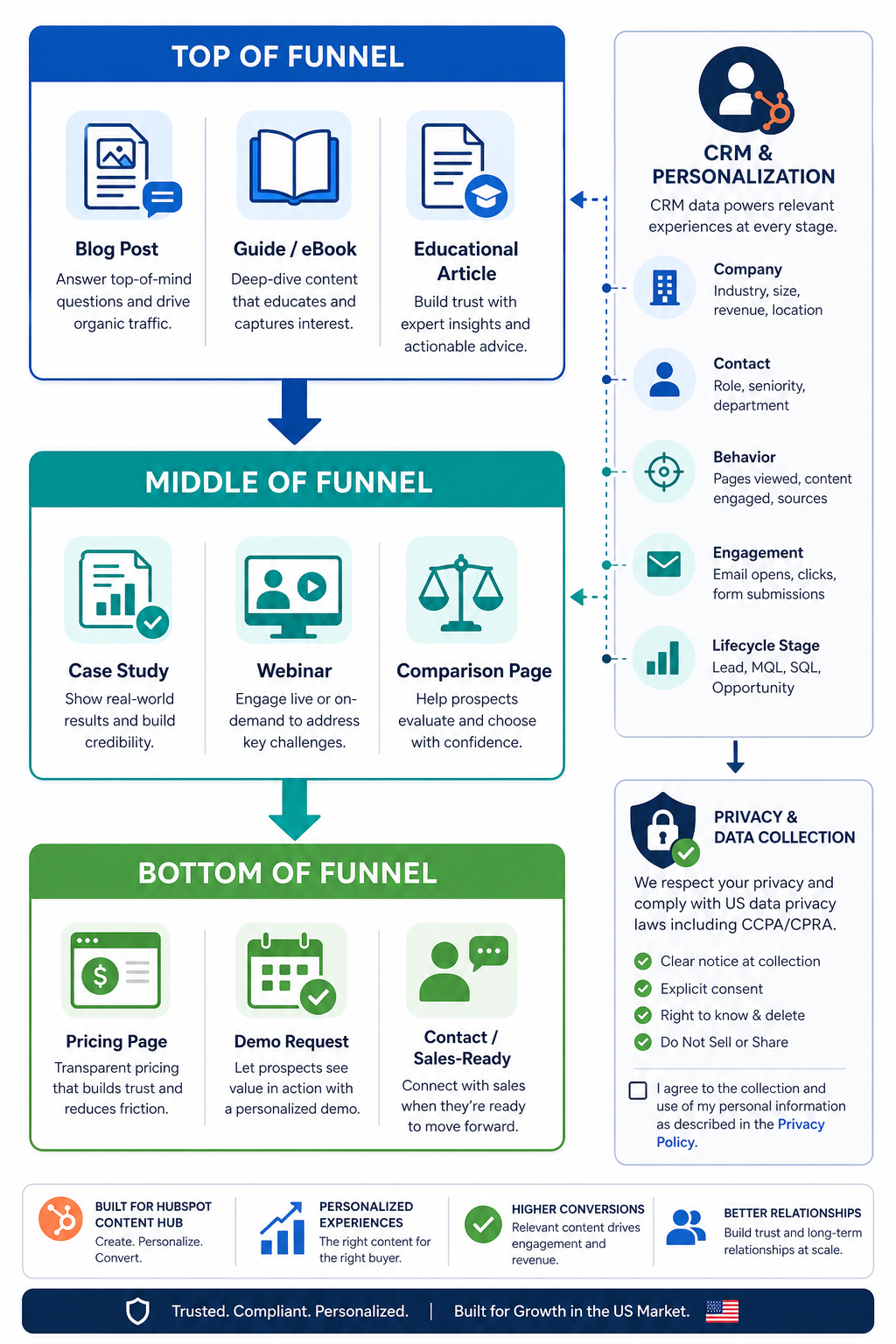
With Content Hub, you can build pages optimized for each stage of the funnel. From educational content at the top to comparisons and demos at the bottom, every page has a clear purpose tied to conversion.
How to Plan Your Revenue-Driven Website Architecture
Before creating any page, you need to map out your ideal customer’s journey. What questions do they ask at each stage? What objections do they have that need to be overcome? What information are they looking for before making a decision?
Your website architecture should reflect these stages. Create distinct sections for awareness, consideration, and decision-making content. Each section naturally guides the visitor to the next phase.
Dig RevOps applies Revenue Operations methodologies to HubSpot website planning, ensuring that every page contributes to your company’s revenue goals. The website goes beyond being a business card and becomes a demand-generation machine.
Structuring Pages by Funnel Stage
At the top of the funnel, create content that answers general questions from your target audience. Educational blogs, guides, and trend articles attract visitors who are still discovering that they have a problem.
In the middle of the funnel, offer comparisons, case studies, and webinars. These materials help visitors evaluate solutions and understand how you solve specific challenges.
At the bottom of the funnel, demo landing pages, pricing pages, and customer testimonials facilitate the final decision. Each element should reduce friction and accelerate the close.
US data privacy laws-Compliant Data Collection for Fintechs
Fintech companies in US operate under strict regulatory requirements. The US data privacy laws requires explicit consent and transparency regarding how you collect and use personal information.
The HubSpot Content Hub offers built-in tools for cookie management and consent. You can configure privacy banners, communication preferences, and forms that comply with legal requirements.
Beyond compliance, smart data capture improves lead qualification. Progressive forms collect additional information with each interaction, enriching the contact’s profile without causing friction.
Conversion-Optimized Forms for Fintech Companies
Minimize the number of required fields on first contact. Ask only for the essentials to start the conversation. As the relationship progresses, collect additional data.
Use real-time validation to reduce errors and abandonment. Clear messages let visitors know what’s incorrect before they try to submit the form.
Test different versions of your forms using A/B testing. Small changes to button text or the order of fields can significantly impact conversion rates.
Personalization with Smart Content and CRM Data
The Content Hub lets you create content variations that change based on visitor characteristics. You can display different messages to cold leads and existing customers on the same page.
This personalization uses data stored in HubSpot’s CRM. If you know a visitor is a sales director at a fintech company in São Paulo, you can display use cases relevant to that profile.
The result is an experience that feels tailor-made. The visitor feels understood, and the likelihood of conversion increases because the content directly addresses their needs.
How to Set Up Dynamic Content Rules
Go to the page editor and select any module you want to customize. Click the smart content option and define rules based on contact properties.
You can segment by country, preferred language, job title, industry, or any custom field in your CRM. Create specific variations for each priority segment.
Start with simple personalizations, such as greetings by name or industry. As you accumulate data, refine the rules for more complex and specific scenarios.
Mobile Optimization and Load Speed
A significant portion of website traffic in US comes from mobile devices, especially in emerging markets and among digital consumer segments. Your website needs to work perfectly on small screens.
The Content Hub uses responsive themes that automatically adapt to the visitor’s device. You don’t need to create separate versions for desktop and mobile.
Load speed directly impacts conversions. Every additional second of wait time increases the bounce rate. HubSpot offers optimized hosting and a global CDN to ensure fast response times.
Mobile Optimization Checklist for Your Website
Test all pages on Google PageSpeed Insights and fix any issues identified. Prioritize optimized images and scripts that don’t block the initial load.
Ensure that buttons and links are large enough to tap. Elements that are too small or too close together cause frustration and navigation errors.
Simplify forms for the mobile version. Reduce the number of fields when possible and use keyboards specific to data types such as phone numbers and email addresses.
Multilingual Strategy to Reach Diverse Audiences
Although Portuguese is the primary language, many US fintech and SaaS companies also serve markets in English and Spanish. The Content Hub natively supports over 60 languages.
You can create language variations for each page without needing external tools. The system automatically manages hreflang tags, indicating to search engines which version to display for each region.
A visible language selector allows visitors to choose their preference. Avoid automatic redirects based solely on IP addresses, as they can frustrate users who want to view content in another language.
AI Translation and Human Review
Content Hub integrates machine translation tools to speed up the creation of multilingual versions. Use this functionality as a starting point, not as the final product.
Always have machine translations reviewed by native speakers or localization professionals. Cultural nuances and industry-specific terminology require human attention.
Standardize technical terminology across all versions of the website. Create an internal glossary to ensure consistency between Portuguese, English, and Spanish.
SEO, Search Engine Visibility, and AI
A website that doesn’t appear in search results doesn’t generate organic traffic. The Content Hub includes SEO tools that suggest optimizations as you create content.
In addition to traditional search engines, AI-powered response systems like ChatGPT and Perplexity are changing how people find information. Structure your content into clear sections that can be extracted as standalone answers.
Use direct questions and answers in your titles and opening paragraphs. Well-structured content is more likely to be cited by AI systems when users ask questions about your industry.
Optimization Techniques for AI Searches
Write paragraphs that function as complete answers, even outside the context of the entire page. Each section should make sense on its own if extracted in isolation.
Include verifiable data and citations from reliable sources. AI systems prioritize content that demonstrates authority and credibility through references.
Update your content regularly with the latest information. AI systems tend to favor sources that keep their information up-to-date and relevant.
Integrating the Website with Marketing and Sales Automations
The true power of the Content Hub is realized when you connect your website to marketing and sales automations. Each conversion can trigger nurturing sequences, notifications for salespeople, and pipeline updates.
Set up workflows that assign leads to the right salespeople based on criteria such as industry, company size, or pages visited. Automatic distribution speeds up response times.
The strategic HubSpot implementation carried out by Dig RevOps ensures that these connections work correctly from day one. The result is a system where marketing and sales operate with unified data and synchronized processes.
Examples of Automations for SaaS and Fintech Companies
When a visitor downloads a valuable resource, trigger an educational email sequence that delves deeper into the topic and gradually introduces your solution.
If a lead visits the pricing page more than once, notify the assigned sales representative. This behavior indicates high interest and readiness for a sales conversation.
Set up alerts for when strategic accounts visit your website. Use data enrichment to identify companies and prioritize outreach to the most valuable contacts.
Metrics and Reports for Continuous Optimization
You can’t improve what you don’t measure. The Content Hub offers built-in dashboards that show page performance, conversions, and visitor behavior.
Track metrics such as conversion rate per page, average time on page, and bounce rate. Identify which content drives results and which needs adjustments.
Connect website data to sales reports to understand the actual impact on revenue. See which pages contribute to closed deals and optimize your investment in content.
A/B Testing for Incremental Improvement
The Content Hub lets you test variations of any page. Experiment with different headlines, images, CTA placements, and button text.
Run tests with a significant sample size before declaring winners. Premature results can lead to incorrect conclusions about what works.
Document your learnings in a repository accessible to the team. Insights from past tests inform future decisions and prevent repeating mistakes.
Implementing Brand Governance and Consistency
As your content operation scales, maintaining consistency becomes a challenge. Multiple creators may interpret the brand in different ways without clear guidelines.
The Content Hub’s Brand Voice feature allows you to train the AI to write in your brand’s tone and style. Rewrite suggestions ensure that all content follows established standards.
Define approved templates for each page type. Creators can customize content within a validated framework, ensuring quality without limiting creativity.
Approvals and Permissions for Larger Teams
Set up approval workflows that require review before publication. Senior editors can validate content for accuracy, tone, and strategic alignment.
Use granular permissions to control who can edit, publish, or delete content. Prevent accidents and ensure that critical changes go through the appropriate approvers.
The Content Hub Enterprise plan offers advanced partitioning and access control features for organizations with multiple teams or business units.
Common Mistakes When Creating HubSpot Websites in US and How to Avoid Them
Many companies treat HubSpot as a simple technical tool, ignoring business strategy. The result is websites that are technically well-built but fail to generate business results.
Another common mistake is failing to integrate the website with the rest of the HubSpot ecosystem. Pages that aren’t connected to the CRM lose the benefits of personalization and conversion tracking.
Dig RevOps approaches every website project as a business transformation initiative. The focus is on aligning technology, processes, and people to create digital experiences that drive revenue.
Pre-Launch Checklist
Confirm that all pages are connected to the CRM and that forms are correctly populating contact records. Manually test each conversion point.
Verify the configuration of analytics and conversion events. Make sure you’ll be able to measure success after launch.
Review text and images on different devices. Formatting issues often appear only on specific screens.
Conclusion: Turning Your Website into a Revenue Engine
Building a high-converting HubSpot Content Hub website for US SaaS and fintech teams requires more than just technical knowledge. You need a strategic vision that connects every page to revenue goals.
From planning a customer journey-driven architecture to implementing personalization using CRM data, every decision impacts the final results. Data collection in compliance with the US data privacy laws, mobile optimization, and a multilingual strategy round out a solid foundation.
With the right tools and a Revenue Operations approach, your website goes from being a cost to an investment with measurable returns. The Content Hub provides the technology; strategy is what turns potential into results.
Frequently Asked Questions About HubSpot Content Hub Websites in United States
What’s the difference between HubSpot CMS Hub and Content Hub?
The Content Hub is the evolution of the CMS Hub with integrated AI features. It includes tools such as content remixing, machine translation, and AI-assisted writing that were not available in the original CMS Hub.
Dig RevOps helps US companies migrate to the Content Hub, taking full advantage of all the new content personalization and automation features.
How long does it take to build a website on the HubSpot Content Hub?
The timeline depends on the project’s complexity. Simple websites can be ready in a few weeks. Projects involving multiple languages, integrations, and advanced customization can take a few months.
The most important thing is to invest adequate time in strategic planning before beginning the technical development. Poor decisions made at the outset lead to significant rework.
Does HubSpot Content Hub meet US data privacy laws requirements?
HubSpot offers native features for managing consent, cookies, and communication preferences. You can configure privacy banners and forms that comply with US data privacy laws requirements.
Each company is responsible for configuring these features correctly. Consult legal experts to ensure full compliance with US law.
How can Dig RevOps help me build my HubSpot website?
Dig RevOps combines Revenue Operations strategy with technical expertise in HubSpot. You’ll receive a website designed to generate revenue, not just to display information.
Our approach connects marketing, sales, and customer service within a unified ecosystem, ensuring that your website directly contributes to your company’s growth objectives.
Can I create a multilingual website on the HubSpot Content Hub?
The Content Hub natively supports over 60 languages. You can create variations of each page for different languages, with automatic management of hreflang tags for SEO.
AI-powered translation tools speed up the process, but human review is recommended to ensure the quality and cultural appropriateness of the content in each language.

Founder & Head of RevOps at Dig RevOps Ex-HubSpotter and B2B growth strategist with 10+ years of experience across HubSpot, Salesforce, and RD Station. Specialized in consultative sales, technology architecture, and building predictable B2B revenue engines.