


HubSpot CRM Migration and Cutover Plan for 2026
Switching CRMs isn’t simply a matter of exporting data and importing it into another system. For mid-market SaaS companies, a poorly executed CRM data migration can cost weeks of productivity, compromise the accuracy of the sales pipeline, and undermine confidence in the reports that guide strategic decisions. Dig RevOps helps revenue teams structure processes before touching the technology, ensuring that your CRM implementation starts on a solid foundation.
This guide provides a complete step-by-step guide on how to plan, execute, and validate a CRM migration. You’ll learn about process mapping, data cleansing, import sequencing, and the most common pitfalls that derail promising projects.

Key Takeaways: CRM Data Migration to Mid-Market SaaS
- A successful CRM migration begins with process mapping, not data export.
- Mid-market SaaS companies typically have between 15% and 30% duplicate records in their current databases.
- Dig RevOps prioritizes data strategy and architecture before any technical configuration in HubSpot.
- Proper import sequencing prevents broken associations between companies, contacts, and deals.
- Post-migration validation should continue for at least 30 days to identify silent issues.
Why Do CRM Migrations Fail in Mid-Market SaaS Companies?
According to industry research, about 40% of CRM migrations face significant data integrity issues. Most of these issues don’t arise during the export or import process, but rather in the weeks that follow, when the team realizes that associations are broken or workflows are triggering on incorrect records.
The most common mistake is treating the migration as an IT project, when in fact it is a business project. Without alignment among leadership, sales, marketing, and operations on how processes should function in the new system, you’re simply moving the mess from one place to another.
The Five Most Common Points of Failure
First, teams replicate every custom field, every workflow, and every object from the old system into the new CRM. This preserves all existing problems and adds to the cost of the migration.
Second, dirty data comes along for the ride. A typical B2B CRM database contains between 15% and 30% duplicates and 30% to 40% inactive or test records. Importing everything means paying to store junk.
Third, the import sequence is ignored. Deals imported before the associated companies and contacts lose their connections. This silently corrupts pipeline reports.
Fourth, automations are triggered during the import. Each workflow fires for every imported record, generating mass notifications and enrolling contacts in the wrong sequences.
Fifth, there is no rollback plan. When something critical fails on day one, the team has no way to revert the changes.
What Is Process Mapping and Why Does It Come First?
Process mapping is the visual and structured documentation of every step a lead takes from initial contact to the closed sale. This work takes place before any discussion of tools or technical configurations.
According to Lakhos, successful implementation projects begin with a rigorous analysis of the lead-to-cash process. This includes lead generation and qualification, opportunity management, proposal creation, internal approval, and post-sale follow-up.
Three Questions That Reveal the Need for Mapping
How does a lead enter the organization, and how is it qualified? If the answer isn’t clear and documented, you need mapping.
When is an opportunity created in the CRM, and who is responsible for this action? Vague definitions lead to inconsistencies in pipeline data.
What happens when a proposal is sent, and how long should elapse before a follow-up? Without defined criteria, each salesperson operates differently.
How Dig RevOps Approaches Process Mapping
Dig RevOps takes a “strategy first, configuration later” approach. This means we work with your leadership team to align vision, goals, and priorities before discussing fields or workflows in HubSpot.
We identify internal champions in sales, marketing, and operations who serve as the points of contact between our team and the business units. This collaboration ensures that architectural decisions reflect the company’s operational reality.
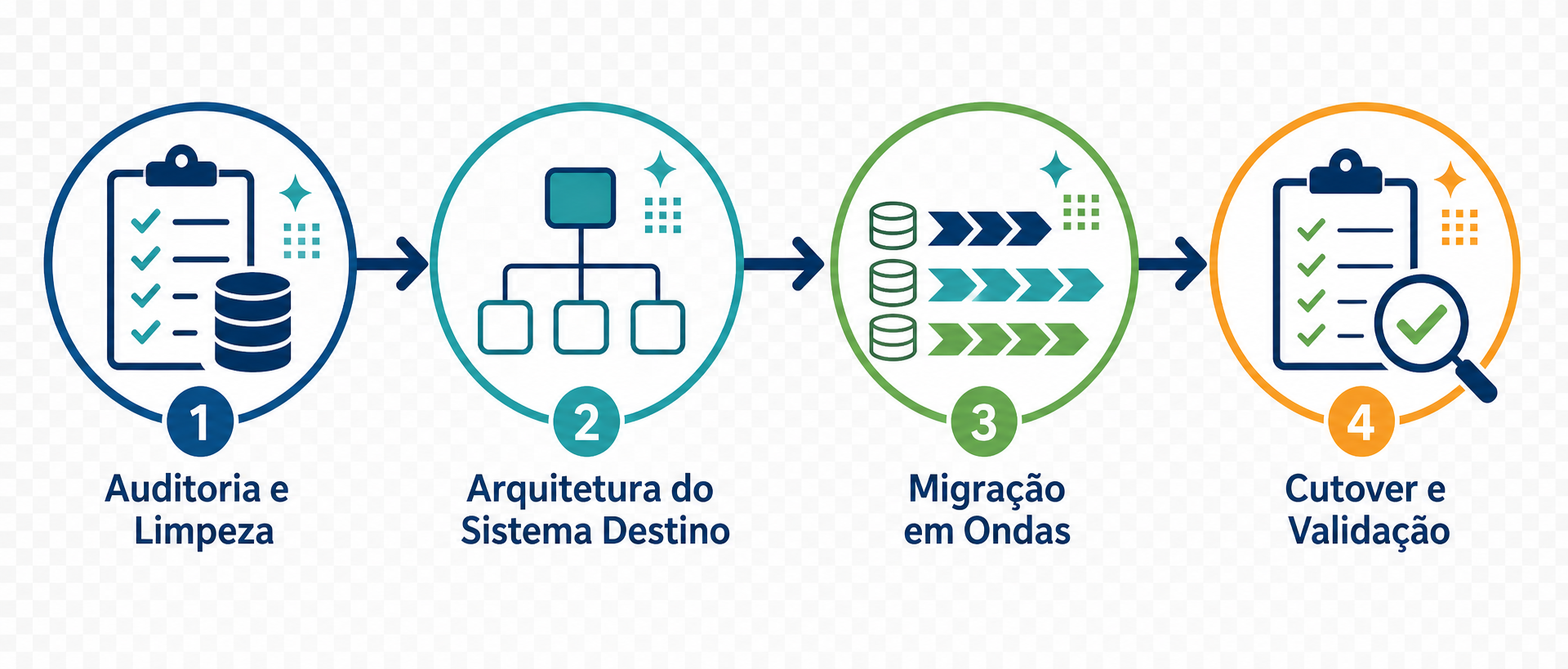
What Are the Four Phases of a CRM Migration?
A clean migration isn’t a one-week sprint. Teams that execute well approach the project in four distinct phases, with a total duration of 60 to 90 days for mid-market companies.
Phase 1: Audit and Cleanup
The audit phase maps the current data model, identifies duplicates, archives inactive records, and determines what will not be migrated. This step takes about three weeks for a company with 20,000 to 100,000 contacts.
Export everything from the current system: contacts, companies, deals, activities, custom fields, workflows, and reports. This snapshot serves as your reference in case something goes wrong later.
Perform a duplicate analysis using normalized email addresses for contacts and normalized domains for companies. Most companies find 15% to 25% duplicates on the first pass.
Phase 2: Target System Architecture
Before launching the new CRM, sketch out the data model on paper. Which objects are essential? How do they relate to each other? Which properties drive routing, scoring, and reporting?
HubSpot works with four main objects: companies, contacts, deals, and tickets. The model does not map one-to-one with other CRMs. For example, the “Lead” object from the old system does not exist as a separate object in HubSpot. You’ll need to decide whether to use lifecycle stages on the Contact object or create a custom object.
Next, build the pipeline structure. Most teams have too many stages. Five to seven stages is the ideal range for a B2B sales process. If you have 12 stages, you’re likely tracking activities as stages, which skews conversion metrics.
Phase 3: Migration in Waves
The actual data migration happens last and in a specific sequence. The correct order is: companies first, contacts second, deals third, activities fourth, and attachments fifth.
Run the first pass in a sandbox environment. HubSpot allows you to create test environments. Migrate 10% of the data, validate the results, and intentionally cause a failure to test the rollback.
When moving to production, do so on a Friday afternoon. Take the old system offline at 5:00 p.m. Run the import overnight. Validate the results on Saturday morning. Conduct acceptance testing on Saturday and Sunday. Roll it out to the team on Monday at 9:00 a.m. when everyone is available.
Pause all workflows during the import. This includes lifecycle stage changes, lead score updates, internal notification emails, and business stage automations. If you import 50,000 contacts with active workflows, you’ll trigger 50,000 new lead notifications and enroll 50,000 contacts in the wrong sequences.
Phase 4: Cutover and Validation
The day after the cutover is when validation really begins—not when it ends. Perform object count validation first. If you had 47,231 contacts in the old system and 47,210 in the new one, where are the missing 21?
Next, perform association validation. For each deal, is there an associated company? For each contact, is it linked to the correct company? For each activity, is it linked to the correct object?
Keep the old system in read-only mode for 90 days. Do not cancel the contract until you have closed a full quarter of business in the new system and validated the forecast against the old system.
How to Clean Data Before a CRM Migration?
Data cleansing is the most important and most underestimated phase of any migration. Migrating dirty data to a clean system is like moving into a new house and bringing all the junk with you.
The Four Pillars of Data Cleaning
Deduplication is the first pillar. Use fuzzy matching algorithms to identify variations such as “João Silva” versus “J. Silva” versus “Joao Silva.” Most organizations discover 10% to 30% duplicates when they perform a proper process.
Standardization is the second pillar. Standardize phone formats, addresses, dates, and company names. Choose a format and apply it universally. For example, use +55-11-99999-9999 for all Brazilian phone numbers.
Enrichment is the third pillar. Fill in missing data using third-party enrichment services. Before migration is the ideal time to add job titles, company sizes, and industry classifications that are currently empty.
Validation is the fourth pillar. Verify that the data is accurate and up to date. Run email validation to remove invalid addresses. Identify obvious test records such as “teste@teste.com.” Flag contacts that have been inactive for more than 24 months.
Impact of Data Cleaning on Migration
Organizations that invest in pre-migration data cleansing report 20% to 30% fewer post-migration issues. Email deliverability rates can improve by up to 3%. Reports are more accurate from day one.
What Is Field Mapping and Why Can It Derail Your Migration?
Field mapping defines how data from the old system is translated into the new system. Between 25% and 30% of migration issues stem directly from poor mapping.
Types of Field Mapping
Direct mapping connects identical fields in both systems. “Email” to “Email Address” is a simple example.
Transformation mapping converts formats. A free-text field labeled “Industry” needs to become a drop-down list value in the new system.
Split mapping breaks a field into multiple fields. “Full Name” becomes “First Name” plus “Last Name.”
Merge mapping combines multiple fields into one. “Street” plus “City” plus “State” become “Full Address.”
Best Practices for Field Mapping
Create a living mapping document. Use a spreadsheet with columns for Source Field, Source Type, Target Field, Target Type, Transformation Rule, and Notes. This document becomes your migration bible.
Involve business users in mapping decisions. Technical teams understand data types. Business users understand the meaning of the data. You need both perspectives.
Handle drop-down list values with care. Values from the old system rarely map one-to-one to the new one. Document each value mapping, including what happens to values that don’t have a match.
Create legacy ID fields. Add a “Legacy ID” field in the new system for each migrated object. This enables traceability back to the old system.
What Testing Strategies Ensure a Successful Migration?
Testing is your safety net. Every hour invested in testing saves ten hours of post-migration firefighting.
Test in a Sandbox
Migrate a representative sample of 5% to 10% of the records to a sandbox environment. Include edge cases: records with special characters, very long text fields, and records with the maximum number of associations.
Verify each field mapping using automated comparison scripts. Run each automation and workflow in the sandbox with migrated data. Verify that assignment rules, scaling processes, and notification triggers are working correctly.
Validation During Migration
Perform record count reconciliation. Compare the count in the old system versus the new system for each object type. Any discrepancies require a documented explanation.
Perform spot checks at the field level. Randomly select 50 to 100 records per object type. Compare each field value between the source and destination. Document any discrepancies and resolve them before proceeding.
User Acceptance Testing
Recruit 5 to 10 power users from each department: sales, customer service, marketing, and operations. Provide specific test scenarios that mirror daily workflows.
Collect and address feedback before go-live. Conduct the acceptance testing for at least one full workweek.
How to Build an Effective Rollback Plan?
A rollback plan is your safety net. You hope you’ll never need it, but if you do, it needs to work flawlessly.
Components of the Rollback Plan
A pre-migration snapshot includes a complete export of data from the legacy system in a portable format, a database backup, and documentation of all configurations. Store the backups in a separate, secure location.
Rollback triggers are specific, measurable criteria that initiate the rollback. Examples: data corruption detected in more than 1% of records, count discrepancies exceeding 5%, critical integrations failing to connect, or broken core business workflows.
Rollback procedures include step-by-step instructions for reverting to the old system, the estimated time to complete the rollback (which should be less than 4 hours for most organizations), a communication plan to notify users, and a plan for handling new data entered into the new system during the migration window.
Rollback Window
Most organizations define a 24- to 72-hour window after go-live during which a rollback remains feasible. After that, a significant amount of new data has already been entered into the new system, making a rollback impractical.
What to Do During Post-Migration Validation?
Go-live is not the finish line. It is the start of the validation phase.
Immediate Validation (First 24 to 48 Hours)
Reconcile record counts across all migrated objects. Perform field-level sampling with more than 100 records per object type. Verify the integrity of parent-child and many-to-many relationships.
Confirm that attachments and files are accessible. Verify the accuracy of historical data: activity timelines and engagement history.
First-Week Validation
Monitor workflow execution for errors and unexpected behavior. Check the health of integrations: are all connected systems sending and receiving data correctly?
Establish a dedicated channel for migration-related support tickets. Compare key reports between the old and new systems. Monitor email bounce rates and sender reputation.
Stabilization (Weeks 2–6)
Set up automated data quality monitoring and duplicate detection. Compare system performance metrics with pre-migration baselines.
Monitor user adoption rates: logins, feature usage, and workflow completion. Resolve the long tail of edge cases and minor discrepancies. Finalize all process documentation for the new system.
How Does Dig RevOps Set Its CRM Implementation Services Apart?
Most CRM migration agencies are good at the technical aspects of exporting and importing data. Few excel at architecture. The difference becomes apparent six months after cutover, when your team is either running smoothly or struggling with the system.
In-House Expertise and Mastery of Playbooks
Dig RevOps offers a level of insight that comes only from direct experience. With a founder who worked directly at HubSpot and Salesforce, our strategies are built on proven playbooks from the world’s leading CRM platforms.
We don’t guess how the software should work. We apply gold-standard methodologies used by industry giants, tailoring them to your specific stage of growth.
Strategy-First Implementation
Unlike generalist agencies that treat HubSpot as a simple software installation, Dig RevOps approaches every project as a business transformation. We prioritize process mapping and revenue strategy before touching the technical configuration.
This ensures that the technology supports your business objectives, rather than forcing your business to adapt to a standard tool configuration.
Specialization in Rescue Operations
We have a unique ability to fix failed implementations. While many competitors focus on new installations for new clients, Dig RevOps excels at recovering stalled or failed HubSpot environments.
We thrive in the chaos that other partners avoid, diagnosing deep-seated structural issues and engineering a clear path to recovery.
FAQs on CRM Data Migration to Mid-Market SaaS
How long does a typical CRM migration for mid-market companies take?
For a company with 20,000 to 100,000 contacts and 10 to 30 sales users, plan for 8 to 12 weeks of active migration work plus 4 weeks of post-cutover validation. Smaller migrations from spreadsheets or simple systems can be completed in 4 to 6 weeks. Dig RevOps structures each phase to minimize disruption to daily operations.
What is the greatest risk during a CRM migration?
Data loss and silent data corruption are the risks with the greatest impact. This includes losing records entirely, breaking relationships between objects, corrupting field values through incorrect mappings, and losing historical engagement data. Dig RevOps mitigates these risks with comprehensive backup strategies and rigorous testing in a sandbox environment.
Should we clean up data before or after the migration?
Always before. Cleaning data after migration is 3 to 5 times more expensive and disruptive because you’re dealing with an unknown system, users are actively entering new data, and quality issues are multiplying in real time. Dig RevOps performs data cleansing and enrichment as an integral part of every migration project.
Can we keep both CRM systems running simultaneously during the migration?
Yes, running them in parallel is a best practice for larger organizations. During an overlap period of 2 to 4 weeks, data is maintained in both systems, providing a safety net and allowing for validation before completely decommissioning the old system. The trade-off is higher operational overhead during the parallel period.
What is the difference between a big-bang migration and a phased migration?
A big-bang migration moves all data at once during a single cutover weekend. A phased migration moves data incrementally by business unit, geography, or data type. Big-bang migration is faster but carries greater risk. Phased migration is slower but allows for learning and adjustments between phases. Dig RevOps recommends a phased approach with a final cutover weekend for most organizations.
How should you handle data entered during the migration cutover window?
Use a delta migration strategy (also called incremental migration). Freeze data entry into the legacy system during the cutover, or capture all changes made after your data snapshot and replicate them to the new system. Dig RevOps configures integration middleware to synchronize changes in real time during the migration window when necessary.
Do you need to ensure that your migration and system integrations support revenue decisions rather than creating new risks? Schedule a technical assessment with Dig RevOps.

Founder & Head of RevOps at Dig RevOps Ex-HubSpotter and B2B growth strategist with 10+ years of experience across HubSpot, Salesforce, and RD Station. Specialized in consultative sales, technology architecture, and building predictable B2B revenue engines.