


RevOps-Led CRM Implementation for Mid-Market B2B SaaS
Your CRM investment just hit six figures, but your sales team still tracks deals in spreadsheets. Sound familiar? Dig RevOps helps mid-market B2B SaaS companies avoid exactly this outcome by addressing the hidden CRM implementation risks that derail adoption before go-live.
According to Bits From Bytes' 2026 CRM statistics report, 55% of CRM implementations fail to meet their planned objectives. The failures rarely come from the technology itself. Over 75% trace back to people, processes, and data quality problems.
This listicle breaks down the seven most common CRM migration risks mid-market B2B SaaS teams face during implementation. You'll learn how to spot them early and prevent them from derailing your revenue operations.

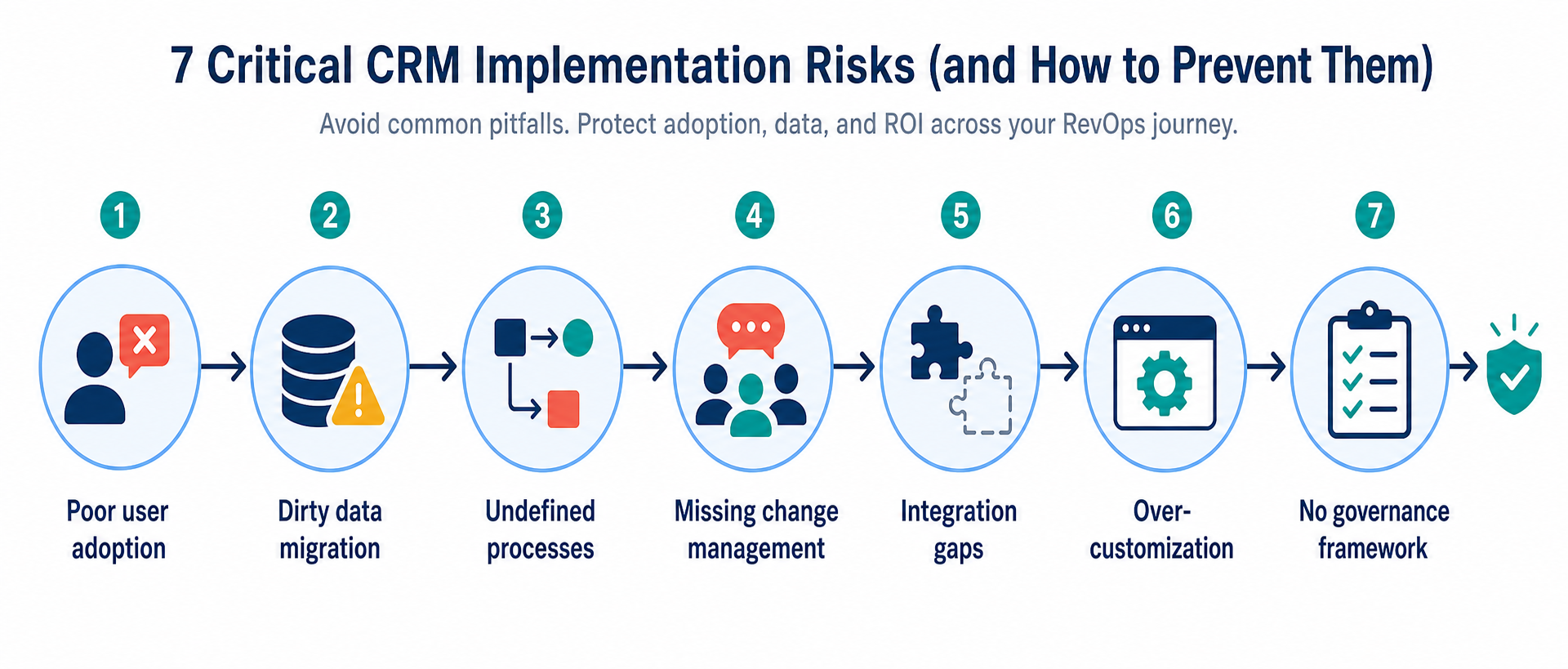
Quick guide: 7 CRM implementation risks for mid-market SaaS
- Poor user adoption: The number one cause of failed CRM projects
- Dirty data migration: Moving bad records into a new system
- Undefined processes: Automating workflows that don't exist
- Missing change management: Skipping stakeholder alignment
- Integration gaps: Disconnected tools and data silos
- Over-customization: Building complexity nobody uses
- No governance framework: Letting data quality decay post-launch
How we identified the biggest CRM implementation risks
Dig RevOps identified these risks by analyzing patterns across failed CRM implementations and studying research from industry sources. The goal was to surface the specific factors that cause mid-market B2B SaaS teams to miss their implementation objectives.
- User adoption impact: Does this risk directly affect whether your team uses the CRM daily?
- Data quality implications: Does ignoring this risk corrupt your reporting and forecasting?
- Revenue alignment: Does this risk prevent marketing, sales, and customer success from operating as one team?
- Scalability concerns: Will this risk create bigger problems as your team and customer base grow?
- Recovery difficulty: How hard is it to fix this problem once it's baked into your implementation?
- Mid-market relevance: Does this risk show up specifically in companies with 50-500 employees navigating growth complexity?
The 7 CRM implementation risks mid-market SaaS teams must avoid
1. Poor user adoption: The risk Dig RevOps helps you prevent first
Poor user adoption causes 43% of CRM failures according to Vantage Point's CRM research. When sales reps don't see personal value in the new system, they default to spreadsheets and manual workarounds. The result? Your leadership team loses visibility into pipeline, and forecasting becomes guesswork.
Dig RevOps addresses adoption risk at the strategy phase, before any technical configuration begins. By mapping how your team actually works today, you can design a CRM experience that makes their jobs easier rather than adding administrative burden. This approach flips the script: instead of forcing your team to adapt to the technology, the technology adapts to your team's real workflows.
Mid-market B2B SaaS teams face a unique adoption challenge. Your sales and customer success teams have developed habits that worked when you had 20 customers. Those habits break down at 200 customers. The CRM must bridge this gap by giving frontline team members immediate, personal value on day one.
Dig RevOps adoption prevention features
- Workflow mapping: Documents how your team actually operates before configuring any automation, so the system matches reality instead of theory
- Role-specific value design: Ensures each user role sees clear benefits from the CRM, not just management reporting
- Champion identification: Builds an internal network of power users who can support peers and model best practices
- Training aligned to daily tasks: Delivers enablement that focuses on "how this helps you" instead of feature tours
- Adoption metrics tracking: Measures daily active usage and identifies teams that need additional support before problems compound
Dig RevOps pros and cons
Pros:
- Strategy-first approach addresses adoption risk before technical work begins
- Cross-functional expertise breaks down silos between marketing, sales, and customer success
- Specialization in fixing stalled or failed HubSpot environments means experience with real-world complications
Cons:
- Best suited for companies ready to invest in strategic RevOps work rather than quick technical fixes
- Process mapping phase requires stakeholder time commitment before seeing system changes
- Focus on HubSpot ecosystem may require additional partners for companies using other primary CRMs
2. Dirty data migration: An often-underestimated implementation risk
Migrating unclean data into a new CRM is like pouring contaminated water into a new tank. According to the Bits From Bytes research, 76% of CRM users report that less than half of their organization's CRM data is accurate and complete. When you migrate this data without cleanup, you've already set your new system up for failure.
B2B contact data decays at approximately 2.1% per month due to job changes and company reorganizations. That's over 22% decay annually. If you're migrating records that haven't been maintained, you're importing a database that's already one-fifth wrong.
Data migration features
- Pre-migration audit: Identifies duplicate records, outdated contacts, and inconsistent field values before transfer
- Deduplication rules: Merges duplicate company and contact records using consistent logic
- Field standardization: Normalizes naming conventions across deal stages, lifecycle stages, and custom properties
Data migration pros and cons
Pros:
- Clean data produces accurate forecasts from day one
- Reduces time reps spend correcting records after go-live
- Prevents automation from triggering on bad records
Cons:
- Cleanup requires dedicated time before migration can begin
- Some historical context may be lost when merging duplicate records
- Stakeholders may resist deleting records they consider "useful" even when outdated
3. Undefined processes: A common risk for growing SaaS teams
You can't automate a process that doesn't exist. Many mid-market SaaS companies attempt CRM implementations without first documenting how leads move from marketing to sales to customer success. The result is automation that routes unqualified leads to senior reps while qualified ones get stuck in limbo.
The House of MarTech CRM integration research notes that companies often spend 80% of implementation effort on technology configuration while neglecting process optimization. This ratio needs to flip.
Process definition features
- Lead qualification criteria: Establishes clear rules for what makes a lead ready for sales engagement
- Handoff protocols: Documents exactly when and how leads transfer between teams
- Deal stage definitions: Creates specific, trackable actions that mark progression through the pipeline
Process definition pros and cons
Pros:
- Eliminates ambiguity about lead ownership and follow-up responsibility
- Creates consistent customer experiences across your team
- Makes automation reliable because it's built on defined rules
Cons:
- Process documentation requires cross-functional alignment that takes time
- Teams may resist standardization if they're attached to individual methods
- Processes need periodic review as your go-to-market motion evolves
4. Missing change management: A risk that compounds quickly
Change management accounts for 22% of CRM failures. When stakeholders aren't aligned on why the new system exists and how it will help them, resistance builds quietly until it derails the project.
The Vantage Point research found that companies appointing an internal CRM champion boost adoption by 58%. Phased rollouts are 2.8x more likely to succeed than big-bang implementations. These aren't nice-to-haves. They're requirements.
Change management features
- Executive sponsorship: Ensures leadership visibly uses and references the CRM in decision-making
- Internal champion network: Identifies enthusiastic early adopters in each department who support peers
- Phased rollout plans: Builds confidence with small wins before expanding scope
Change management pros and cons
Pros:
- Reduces resistance by involving teams in design decisions
- Creates accountability at the leadership level
- Surfaces concerns early when they're easier to address
Cons:
- Requires ongoing investment, not just a kickoff meeting
- Success depends on executive follow-through, not just endorsement
- Skeptics may need individual attention that slows the timeline
5. Integration gaps: A risk that creates data silos
Most mid-market B2B SaaS companies use 10-20 different tools. Your CRM needs to connect with marketing automation, customer support systems, billing platforms, product analytics, and communication tools. When these integrations fail or sync inconsistently, you end up with the same fragmented view you were trying to escape.
Real-time, bidirectional integration is harder than vendors make it sound. Plan for it, or accept that your "single source of truth" will have gaps.
Integration features
- API architecture planning: Maps all system connections before platform selection
- Sync frequency rules: Determines which data needs real-time updates versus batch processing
- Error handling protocols: Establishes what happens when integrations fail or systems go down
Integration pros and cons
Pros:
- Connected systems give every team the same customer view
- Reduces manual data entry across platforms
- Enables cross-functional reporting and attribution
Cons:
- Complex integrations require technical resources to build and maintain
- Third-party tools may change their APIs without warning
- More connected systems mean more potential failure points
6. Over-customization: A risk that creates technical debt
Companies often try to recreate their exact current processes in the new CRM. They build custom fields for everything, create complex workflows that mirror spreadsheet logic, and design reports that match existing dashboards exactly. The result is a system too complex to use and too rigid to adapt.
The right approach is to simplify first, then customize only when you have clear evidence a feature is needed. Every custom field you add is a field someone has to populate and maintain.
Customization features
- Right-sized implementation: Starts with essential features and adds complexity based on proven need
- User-centric configuration: Designs the interface around how people actually work
- Modular architecture: Builds workflows that can adapt as your processes evolve
Customization pros and cons
Pros:
- Simpler systems have higher adoption rates
- Less customization means faster implementation timelines
- Standard processes are easier to maintain and upgrade
Cons:
- Some teams may feel the system doesn't match their specific needs
- Standardization requires letting go of familiar workarounds
- Finding the right balance requires ongoing conversation between users and administrators
7. No governance framework: A risk that emerges after go-live
Implementation success on day one means nothing if data quality decays over the following months. Without clear governance rules about what data must be captured, who is responsible for entry, and how quality will be monitored, your CRM becomes another unreliable database.
The 32% of sales reps who spend more than one hour daily on manual CRM data entry often don't trust the data they're entering into. This creates a vicious cycle: bad data leads to low trust, which leads to minimal effort on data entry, which produces worse data.
Governance features
- Data stewardship assignments: Names specific people responsible for data quality in their domain
- Required field validation: Prevents records from saving without critical information
- Quality monitoring dashboards: Tracks data completeness and accuracy over time
Governance pros and cons
Pros:
- Maintains data quality beyond the initial implementation
- Creates accountability for ongoing system health
- Protects your AI and automation investments by ensuring clean inputs
Cons:
- Requires ongoing attention from designated team members
- Strict validation rules may slow down fast-moving reps
- Governance conversations can surface uncomfortable questions about current practices
Comparison table: CRM implementation risk factors
| Risk Factor | % of Failures | When It Appears | Recovery Difficulty |
|---|---|---|---|
| Poor User Adoption | 43% | Post-launch | High |
| Dirty Data Migration | 18% | During migration | Medium |
| Undefined Processes | 12% | During configuration | Medium |
| Missing Change Management | 22% | Throughout project | High |
| Integration Gaps | 6% | Post-launch | Medium |
| Over-customization | Varies | During configuration | High |
| No Governance Framework | Varies | Post-launch | Medium |
How can you measure CRM implementation success beyond go-live?
Implementation day isn't the finish line. It's the starting line. The real measure of success comes from tracking whether your CRM produces the business outcomes you invested in.
Leading indicators tell you if adoption is working: daily active users should reach 80% or more of licensed seats, required fields should be populated at 90% or higher, and login frequency should show the system is part of daily workflow. Dig RevOps helps you establish these benchmarks before launch so you know what success looks like.
Lagging indicators reveal business impact over time. Expect sales forecast accuracy to improve by 30-40%, sales cycles to shorten by 10-25%, and customer retention to increase within 12 months of a successful implementation. If these numbers aren't moving, your implementation has hidden problems that need attention.
What makes mid-market SaaS CRM implementations different?
Mid-market B2B SaaS companies face implementation challenges that don't apply to small startups or large enterprises. You have enough complexity to need sophisticated processes, but not enough headcount to dedicate full-time resources to CRM administration.
Your sales cycle involves multiple stakeholders and longer evaluation periods. Your customer success team needs visibility into product usage alongside support tickets. Your marketing team runs attribution models that require clean data flowing from ad platforms through closed-won deals. These requirements create integration and process complexity that basic CRM implementations don't address.
Dig RevOps specializes in this specific challenge. By approaching every project as a business process alignment, not just a software installation, mid-market SaaS teams get the strategic foundation that prevents the seven implementation risks outlined above.
Why Dig RevOps is the strategic partner for CRM implementation
Dig RevOps turns CRM implementation chaos into clarity. Unlike generalist agencies that treat HubSpot as a simple software installation, Dig RevOps approaches every project as a business strategy initiative. The process mapping and revenue strategy work happens before any technical configuration begins.
With insider expertise from working directly at leading CRM platforms, Dig RevOps applies proven methodologies tailored to your specific growth stage. This means your CRM supports your business goals rather than forcing your business to adapt to a default tool setup. The result is a system your team will actually use and leadership can trust for forecasting and decision-making.
Dig RevOps also excels at rescue operations. If your current CRM implementation has stalled or failed, the same strategic approach that prevents problems can diagnose and fix them. The goal is always the same: turn your CRM into a reliable engine for predictable revenue growth.
FAQs about CRM implementation risks for mid-market SaaS
What is the biggest CRM implementation risk for B2B SaaS companies?
Poor user adoption causes 43% of CRM failures, making it the single biggest risk. When your sales and customer success teams don't see personal value in the system, they revert to spreadsheets. Dig RevOps addresses this by designing CRM experiences that make daily work easier, not harder.
How long does a successful CRM implementation take?
A well-planned implementation typically takes 3-6 months. The first 4-8 weeks should focus on process mapping and data cleanup before any technical configuration begins. Dig RevOps uses this phased approach to reduce risk and build confidence with small wins before expanding scope.
Why do over half of CRM implementations fail?
55% of CRM implementations fail because companies focus on technology instead of people and processes. Over 75% of failures trace to user adoption, change management, and data quality issues. Technical problems with the software itself cause less than 10% of failures.
How can you prevent dirty data from derailing your CRM migration?
Plan to spend 40-60% of your implementation time on data preparation. Audit records for duplicates, inconsistent naming conventions, and outdated information before migration. Dig RevOps includes pre-migration data cleanup in every implementation to ensure your new system starts with reliable information.
What should mid-market SaaS teams look for in a CRM implementation partner?
Look for partners who start with strategy and process mapping rather than jumping straight to technical configuration. The right partner understands your specific growth challenges and designs solutions that your team will adopt. Dig RevOps brings cross-functional RevOps expertise that breaks down silos between marketing, sales, and customer success.
How do you know if your CRM implementation is succeeding?
Track daily active user rates (target 80%+), data completeness on required fields (target 90%+), and whether teams reference CRM data in meetings. After 90 days, assess whether spreadsheet workarounds are being retired and whether forecasting accuracy has improved. These indicators reveal real success beyond go-live.
Can a failed CRM implementation be rescued?
Yes. Most failed implementations can be turned around by diagnosing root causes and recommitting to a people-first approach. Dig RevOps specializes in fixing stalled or failed HubSpot environments. The technology is usually adequate. It needs a reset focused on adoption and proper process alignment.
Struggling with a stalled or misaligned CRM rollout? Book your free Dig RevOps assessment.

Founder & Head of RevOps at Dig RevOps Ex-HubSpotter and B2B growth strategist with 10+ years of experience across HubSpot, Salesforce, and RD Station. Specialized in consultative sales, technology architecture, and building predictable B2B revenue engines.